


- 304 brushed stainless steel; IP69K (desktop), IP66 (panel mount).
- 14°F to 104°F for legal-for-trade compliance; -4°F to 140°F industrial.
- Approvals: NSF, UL/cUL, and NTEP 10,000d (24-075).
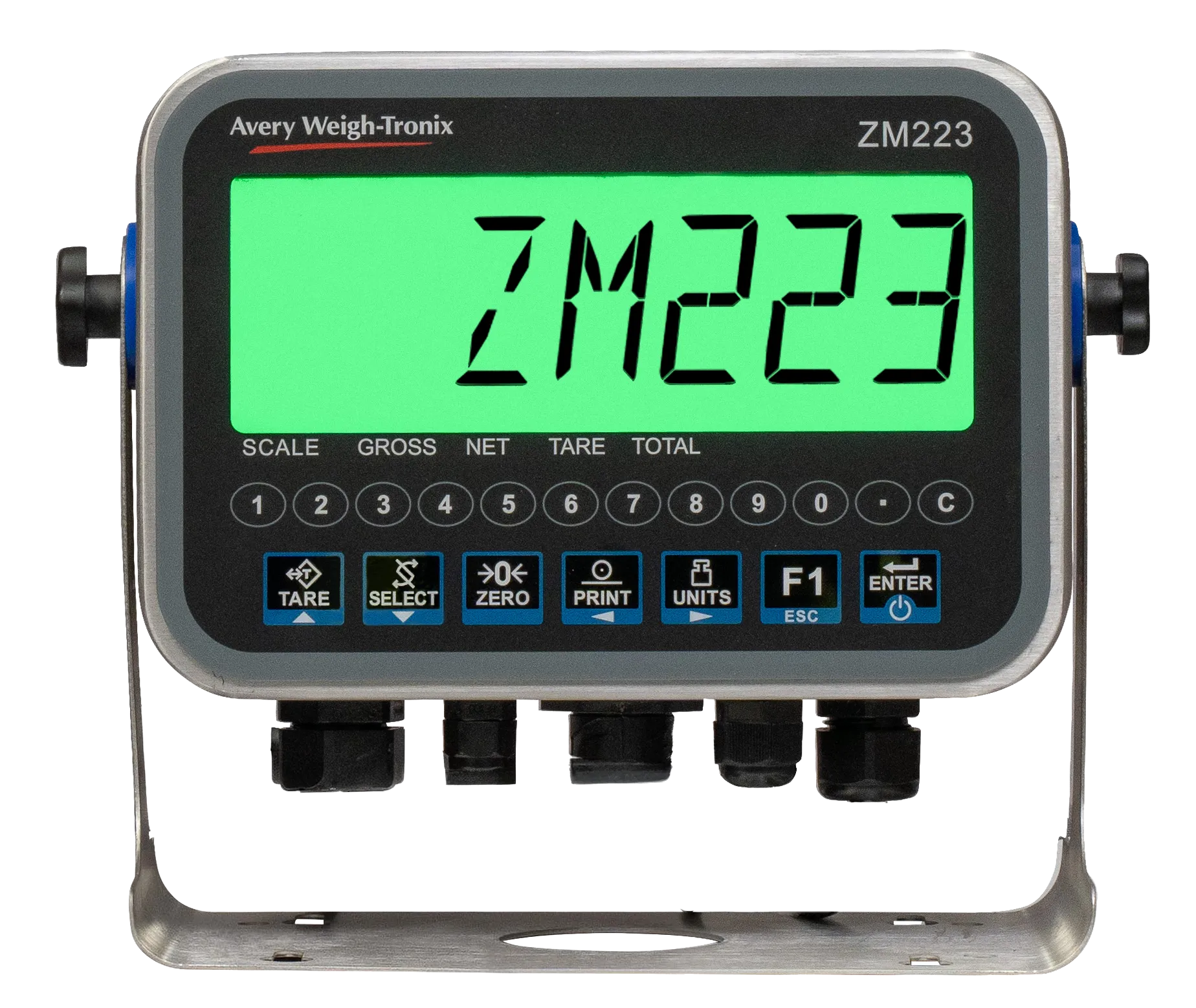
ZM223 Digital Weight Indicator
A multi-functional, customizable weight indicator meant for weight monitoring, data collection, and cloud-based storage. A digital weight indicator for industrial weighing scale systems, in desktop and panel-mount models.
Benefits
Why Choose the ZM223 Weight Indicator
Ready to Work Out of the Box
Built-in apps for weighing, checkweighing, batching, grading, counting, and truck scale in/out.
See Status at a Glance
A color-changing backlight shows under, over, and accept without reading a number.
Connected to Your Systems
Ethernet, Bluetooth, EtherNet/IP, Modbus TCP, HTTPS/RESTful API, and MQTT move data to PLCs, software, and the cloud.
Built for Demanding Environments
304 stainless steel, IP69K on the desktop model and IP66 on the panel mount, and a sunlight-readable display.
Overview
Customizable and durable weight indicator solutions
Designed for weight monitoring, data collection, and cloud-based data storage, the ZM223 Weight Indicator enables control and visibility of processes, from dusty warehouses to food-safe production lines. Housed in a durable stainless steel enclosure (IP69K certified on the desktop model) with a large display, the ZM223 is ideal for applications where clarity, speed, and durability are critical.
The ZM223 comes standard with multiple configurable smart applications that allow for easy integration and meet customization needs depending on installation requirements. Efficiently transfer data using secure cloud connections, view or control the indicator using any networked PC, or pair with the Avery Weigh-Tronix Remote Assist Mobile Application to control and monitor the indicator using a mobile device.
Key Specifications of the ZM223 Weight Indicator
- 1.5″ (38 mm) sunlight-readable display with green, red, orange, and yellow backlight; 19 chemical-resistant keys with configurable secondary functions.
- One analog base (up to eight 350-ohm load cells) plus one BSQ digital base, or two BSQ bases.
- Two RS232, Ethernet, USB host, Bluetooth; EtherNet/IP, Modbus TCP, HTTPS/RESTful API, MQTT; Lua programmable.
- 16 GB micro-SD, 100,000-transaction memory, up to 2,000 PLUs.
- 90–264 VAC (desktop); 12–24 VDC (optional on desktop, required on panel mount).
Key Features
Key ZM223 Features to Compare When Selecting a Digital Weight Indicator
Large, color-changing backlit display
The ZM223 comes with a 7-digit, 1.5″ (38 mm) HTN LCD display with color-changing backlight options (green, yellow, orange, red) providing excellent indoor and outdoor readability with enhanced viewing angles. When checkweighing, the backlight colors give clearer and faster visual prompts, and Under/Over barographs show when a weight is getting close to an accept window or target point.
Personalize the ZM223 to Your Process
With a library of preloaded applications – including general weighing, checkweighing, batching, grading, truck scale in/out, and more, the ZM223 is ready to be easily integrated, right out of the box. It supports both analog and digital scale inputs and offers features like peak hold and filling applications. Customize print formatting to create the exact information needed for an application.
Cloud-based data collection
The ZM223 can now easily connect to cloud services using secure HTTPS/RESTful API or MQTT connections, making it ideal when data needs to be safely controlled centrally from a specific cloud server. It is fully Lua programmable, providing a flexible platform to control and monitor processes from anywhere.
Remote Assist Mobile App
The ZM223 comes standard with a built-in Bluetooth® port that integrates with the Avery Weigh-Tronix Remote Assist™ Mobile App, enabling remote monitoring and control. Operators can enter additional data, such as customer names and addresses, invoice numbers, and batch numbers, for the print ticket or label.
Control processes from any networked PC
The ZM223 web browser page lets you view and control the scale from any PC on the same network, eliminating the need for expensive primary and secondary setups. You can also configure operator prompts and edit UDF fields such as customer names, part numbers, and upper and lower weight levels.
Range of applications available right away
ZM223 Applications Include:
- General Weighing
- Accumulation
- Counting
- Check-Count
- Checkweighing
- Percentage Weight Gain
- Grading
- Filling
- Batching
- Animal Hold
- Peak Hold
- Remote Display
- Truck In/Out

What to check out everything the ZM223 Weight Indicator offers? View our entire playlist here.
Selection Criteria
Key ZM223 Features to Compare When Selecting a Digital Weight Indicator
Selection factor |
Question to ask |
ZM223 |
Interface |
Readable at a glance in any light? | 1.5″ sunlight-readable display, four backlight colors, bar graph |
Connectivity |
Which ports and protocols does your plant use? | RS232, Ethernet, USB, Bluetooth, EtherNet/IP, Modbus TCP, HTTPS/RESTful API, MQTT |
Applications |
Is the application you need built in? | Weighing, checkweighing, batching, counting, grading, truck scale in/out; Lua programmable |
Data handling |
What is captured and shared? | UDF fields, time and date, 100,000 transactions, cloud via API or MQTT |
Remote access |
Who needs access, and from where? | Web browser on the same network; Remote Assist™ app over Bluetooth |
ZM223 vs. Basic Digital Weight Indicators and Standalone Scale Software
A basic digital weight indicator suits local weighing. A connected industrial indicator suits operations that need monitoring, records, and integration. The ZM223 runs its applications on the indicator and shares data through its web page, API, and protocols.
From Weight Display to Usable Records
A basic digital weight indicator suits local weighing. A connected industrial indicator suits operations that need monitoring, records, and integration. The ZM223 runs its applications on the indicator and shares data through its web page, API, and protocols.
How Remote Monitoring and Troubleshooting Support Operations
Supervisors can view and control the ZM223 from a PC or phone without walking to each scale. Connection annunciators and built-in self-diagnostics help technicians check status.
When Cloud-Connected Data Storage Adds Value
Cloud connectivity matters most for multi-site operations, shared reporting, and teams that need weighing data away from the scale. Data can also be stored locally.
Buyer Checklist
Interface:
Readable in your lighting, with status by color?
Connectivity:
The ports and protocols you need?
Applications:
A built-in app, plus the right bases and load cells?
Data handling:
Which records to keep, where, and for whom?
Integration
Scale Software, PLC, and Cloud Connectivity
- PLC: EtherNet/IP and Modbus TCP are built in, with a default PLC configuration to speed setup.
- Scale software and enterprise systems: HTTPS/RESTful API, MQTT, and TCP/UDP sockets let the ZM223 exchange data with your own software.
Calibration
Calibration, Backup, and Maintenance for Reliable Accuracy
- Calibration: two to ten stored points, five-point linearization, programmable zero range, motion detection, and automatic zero tracking.
- Familiar menus: the same password and navigation steps as the ZM3/4 indicator range; the password is not shown on screen.
- Backup: the micro-SD card holds scale profile, PLU database, and alibi memory backups.
- Diagnostics and trade: built-in self-diagnostics; confirm legal-for-trade inspection and sealing requirements with your distributor.
Applications
Choose the Right ZM223 Setup for Your Task
Task |
Starting Configuration |
What to Evaluate |
General weighing |
General weighing, accumulation, peak hold | Platform type, capacity, legal-for-trade need |
Checkweighing |
Checkweighing, percentage weight gain | Targets and tolerances, line speed, washdown rating |
Batching and filling |
Batching, filling | Number of ingredients, I/O count (up to six) |
Counting |
Counting, check-count | Piece weight range, PLU needs, BSQ base for small parts |
Grading |
Grading | Number of bands, light stack |
Truck scale in/out |
Truck scale in/out | Load cells (up to eight), cable distance, surge protection |
Related Products
Case Studies
ZM223 Case Study: One Install, 37 Indicators
Allmetal Recycling, a Kansas City scrap metal recycler, had standardized on Avery Weigh-Tronix equipment across its sites, pairing ZM303 indicators with XR2000 remote displays. Then one newer location needed easier connectivity and better visibility, and its distributors, Accurate Superior Scale and W H Scale Co., recommended a single ZM223.
The ZM223 connected to the network so quickly that the customer “wanted to put the ZM223’s everywhere.” A short evaluation grew into 37 units company-wide, and the large, bright display meant the remote displays were no longer needed. See how one installation became a full upgrade, and what it meant for downtime and equipment.
Individual results vary depending on application, equipment, and operating conditions.
FAQ
Frequently Asked Questions About Weighing Indicators and the ZM223
A weighing indicator reads the signal from a scale’s load cells and turns it into usable weight data. The ZM223 adds built-in applications, a color-changing display, and connections for PCs, phones, PLCs, and cloud services.
The indicator contributes to system performance, but results depend on the full weighing system, including load cells, platform, environment, installation, calibration, and maintenance. The ZM223 carries NTEP approval at 10,000d (24-075).
It carries NTEP 10,000d approval; legal-for-trade status depends on the complete system and local rules. The desktop and panel-mount models are NSF approved for food preparation areas, and the desktop model is IP69K.
One analog base with up to eight 350-ohm load cells, or BSQ digital bench bases, up to two bases total. It does not support the ZB210 Digital Junction Box or ZT Digital Load Cells.
EtherNet/IP and Modbus TCP connect to PLCs. HTTPS/RESTful API, MQTT, and TCP/UDP sockets connect to software and cloud services. Confirm compatibility with your specific software with your distributor.
Consider the application, number of scales, required accuracy, legal-for-trade needs, environment, reporting, integration, and future expansion. Accurate performance depends on the whole system, not headline figures.
The ZM223 replaces the discontinued ZM301, ZM303, and ZQ375. The panel mount fits the ZM301/ZM303 cutout, and the housing fits existing ZM stands and columns.
Compare digital weight indicators on usability, data handling, communications, and integration, not screen size alone. The ZM223 adds a web browser interface, Bluetooth, EtherNet/IP, Modbus TCP, HTTPS/RESTful API, MQTT, and storage for 100,000 transactions.
Load cells measure force on the platform. The indicator excites them, reads their signals, and applies zero, tare, calibration, and filtering. Scale software, whether the ZM223’s built-in applications or your own system, uses that data for records and reports. One analog base supports up to eight 350-ohm load cells, and BSQ digital bench bases are also supported.
The ZM223 is built for industrial weight monitoring, data collection, and cloud-based data storage. Operators work at the indicator, and supervisors can view or adjust it from a PC browser or phone, with data going to a PLC, cloud service, or local storage.
Related resources
ZM223 Weight Indicator Resources
Talk to a local distributor about the right ZM223 configuration.